
New in KVMControl: the machine overview. Your whole machine in one glance
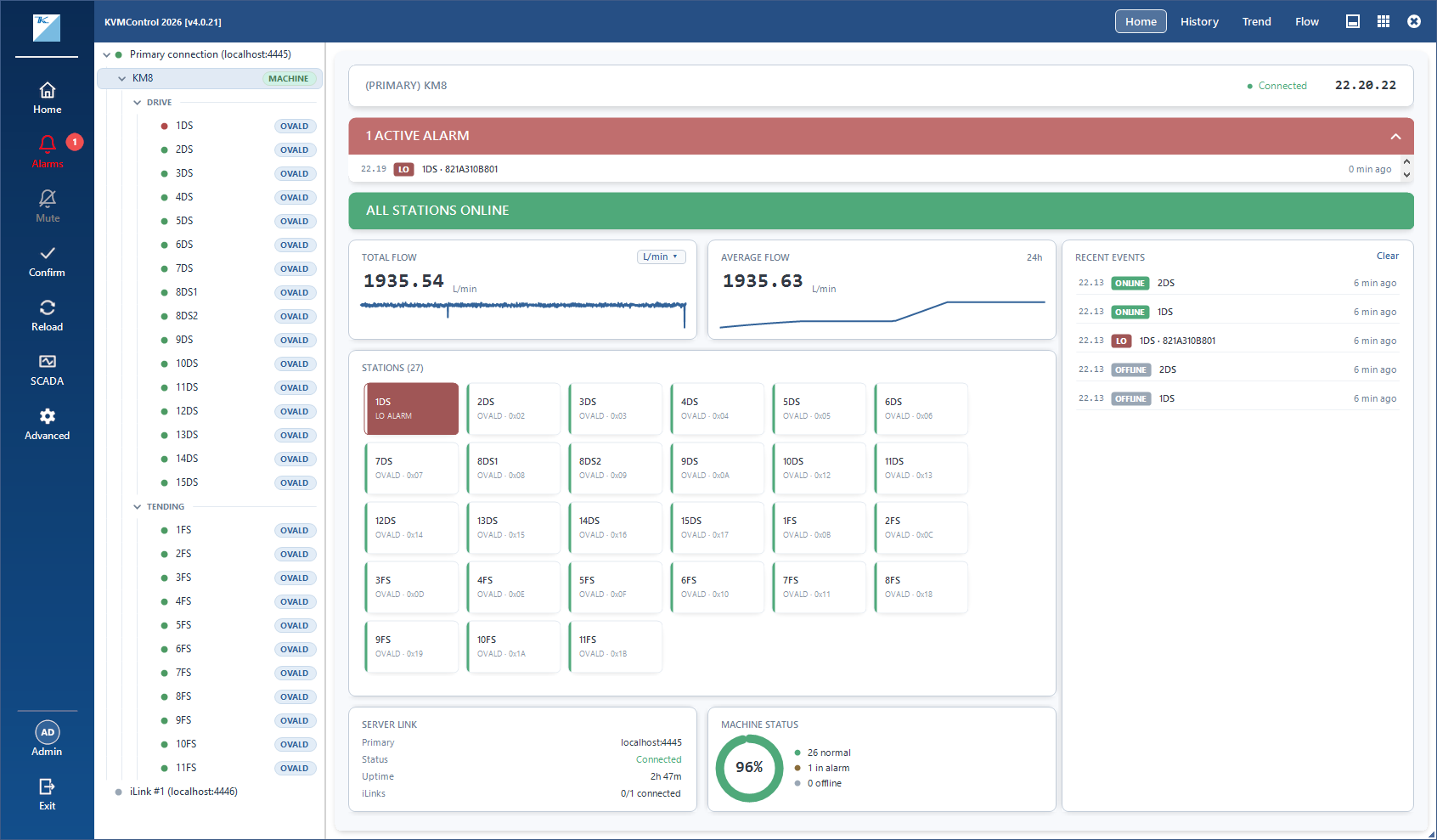
How is the machine doing right now? In KVMControl 2026, the answer is one click away. Select a machine and the new machine overview shows its entire flow system on a single screen: flows, alarms, stations and the server connection, all live
Problems first
Active alarms and offline stations are shown in their own area at the top of the overview. Each offline station comes with its COM port and Modbus address, so maintenance knows exactly where to go
Flow at a glance
- Total flow of the whole machine, live, with a small trend line showing where it's heading
- Average flow over a period you choose, to spot slow changes before they turn into alarms
- Recent alarms listed beside them, newest first
Every station, side by side
No more clicking through the tree to check stations one by one. The overview shows all of them together, each tile marked normal, alarm or offline, so the one that needs attention is easy to spot
Machine status and server link
A single machine status figure sums up how many stations are running normally. The server link card confirms that KVMControl is connected to KVMServer and receiving data
Coming with KVMSuite 2026
The machine overview is part of KVMControl 2026, included in KVMSuite 2026. Together with the new SCADA views, it gives operators both the big picture and the exact spot