
KVMControl 2026: Live flow totals
Knowing that oil is flowing is good. Knowing how much has flowed is better. The redesigned Flow view in KVMControl 2026 shows live totalizer data for your whole lubrication system, so you can check consumption, compare stations and confirm that every point gets what it needs
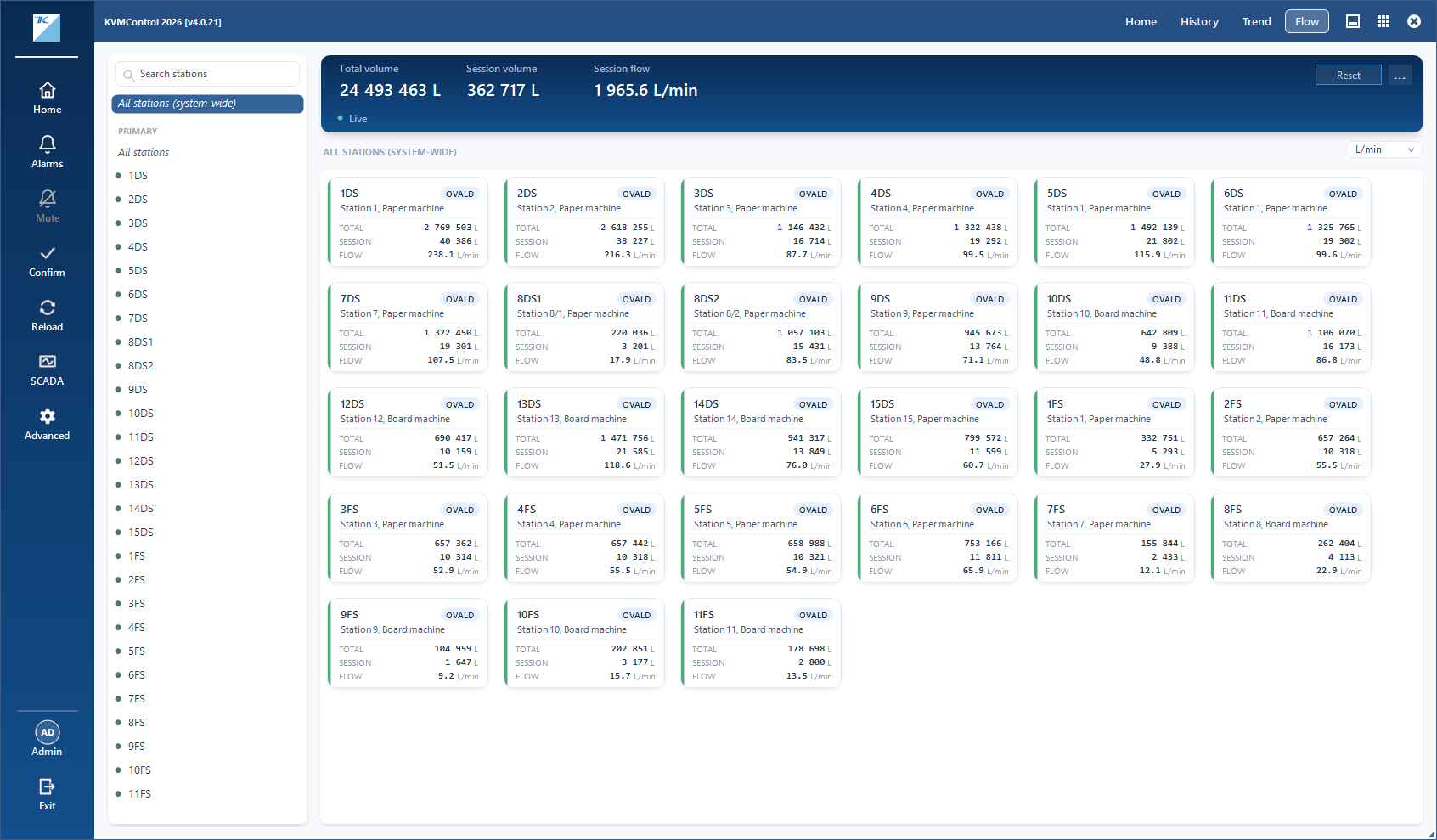
See the whole system
At the top of the Flow view, a summary card shows the grand total across all connected links: total volume, session volume and current flow rate. Only active, connected links are counted. If a remote link goes offline, it drops out of the total instead of quietly freezing the figures
Organized the way your plant is
Stations are grouped by connection, with the primary link first and then each remote link. You can view the totals for all stations, for all stations on one link, or for a single station. Selecting a station shows its individual measurement points, each with its own volumes and flow rate
Always current
Figures update automatically while the Flow view is open, so there's nothing to refresh and you're never looking at stale numbers
Session volume
Session volume is ideal for short-term checks, such as measuring consumption over a shift, after maintenance or during a test run. You can reset it for the whole system or for a single station with one click
Familiar to use
The Flow view uses the same card layout and station tree as the History and Trend views, so it feels familiar from the first click